Smart Phones for Beginners

The Linux based Android OS has changed the smartphone market.
If you are contemplating to make the switch to a smart phone, here is some info which may help you make the switch. Android is the operating system based on Linux and developed by Google. A smart phone is essentially a PC, with some slight limitations. Essentially you can do anything on the smart phone, which can be done on a PC. Many phones including the popular Samsung series are based on Android, but others are based on Windows and IOS (namely Apple). This post deals with Android based phones.
The down side to smart phones is that by default the owner does not have unrestricted access to the device, sometimes limiting the full potential of the device. But of course there are workaround, which rely on rooting the device. Once your device is rooted, you gain full access to your device, allowing you to install even very specialized low level system applications.
Being Linux based Android offers a host of options, tweaks and hacks to the user. Short of writing your own applications or even adapting the OS, many imaginable setups are possible, some of which may not be accessible for an end user though.
Software
 Virtually any software is available for smartphones. Some can be purchased, but a lot of it is available for free. Applications (Apps) are typically installed from the Google Play Store, which requires a google account - just create one from your phone. Once you have an account you can access all the free software, which includes thousands of apps (games, tools & utilities, messaging apps, productivity apps, video & music players and many more). Google Play is somewhat restrictive, as it only lets you install apps straight to the phone. It is not possible to download (say from a desktop) and install later to the phone.
This is where services like F-Droid are less restrictive. F-Droid is an app store for Android applications, similar to the Google Play store. The down side is that it only hosts the open source apps subset of the play store. Apps can also be installed directly on the phone from the relevant *.apk file (which is the installation package file). Such files can be share directly fron phone to phone via bluetooth with software like App Backup & Restore.
 Do yourself a favor and install MyphoneExplorer - it is simply the best tool to access your phone (and data) from a PC or laptop. It allows you to synchronize contacts and other data, make backups, send sms from the pc, initiate phone calls, copy photos, etc. It does most of what you would want. It connects via Wifi or USB cable to the phone. The first connection has to be made via USB that the phone app can be installed and it requires the USB debugging to be active. You will also need to install the phones USB drivers on the host computer.
Reminder: Add a list of useful software here.
Features
Different phones come with different interfaces. Typically they all come with a touch screen LCD display, some buttons, a microphone, speaker, headset adapter (except apple ;-), USB interface, WiFi, Bluetooth, NFC, SIM slot and an SD card slot. These interfaces are not as ubiquitous as on a laptop, but given the size they are adequate and there are normally workarounds. Most notably, many USB devices can be connected on the USB interface given the right adaptor cable, which opens up a world of options.
Smart phones can be used as mobile music players, digital cameras, dicta phones, data store, etc.
Internet Connectivity
You will want to have internet connectivity on your phone if you are to use it to its full potential. Imagine a computer without Internet... oh what tragedy!
The phone is normally connected to the mobile phone network, which can also be used for data connectivity through GPRS or HSDPA (3G), etc., but most phones also have a WiFi connection which can be used to wireless access the internet if the phone is in reach of a Wifi hotspot. The phone can also act as a hotspot allowing you to access the internet from your laptop, through your phones GPRS/3G connection. This is called tethering and is supported by most (all) android phones. Tethering is also available via a USB cable to the phone, where the phone acts as a internet gateway for the connected device (eg a laptop). This is similar in concept like connecting a 3G "dongle" to a laptop via USB.One of these days...
Security
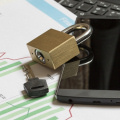 You will be carrying a trove of personal data with you in your pocket (photos, contacts, passwords, financial info, etc.) If your phone is lost or stolen, all that data goes with it. Not only can this be a big loss without a backup; in the wrong hands this data can easily be used for nefarious purposes against you or others. Encrypt your device and keep backups handy on your computer (easily done through My Phone Explorer)! The same security flaws exploited on computers can be used on smart phones to gain access. This is something to be mindful of. Think about what data you are comfortable saving on your phone and don't install random apps or programs. Android devices are not encrypted by default, but encrypting your device is fairly straight forward and it will fend off even the most dedicated data snoops.
Resources
http://www.androidauthority.com/upcoming-smartphone-tech-to-look-forward-to-779229/Comments?
Do you have any ideas or comments? Please comment below.
Comments 336
291. tarrisc4 visweden , Thursday, October 06, 2022, 12:20:
http://asmetalwork.1gb.ua/f...
http://auto-file.org/member...
http://awaretek.com/cgi-bin...
http://azmepakistan.tv/prof...
http://basketball14.discutb...
http://bbs.identityv.jp/hom...
http://bingenow.com/person?...
http://blog.songvault.fm/ar...
http://bluerevolutioncrowdf...
http://community.botball.or...
http://compcar.ru/forum/mem...
http://criminallife.5nx.ru/...
http://dungdong.com/home.ph...
http://epcsoftware.org/memb...
292. linajanker , Friday, October 07, 2022, 09:41:
Thanks for sharing such an information with the help of this article, so glad to read
https://sites.google.com/co... |
https://sites.google.com/co...
293. Thomass , Friday, October 07, 2022, 09:56:
This is a very good and useful blog post.
https://sites.google.com/me...
https://sites.google.com/ma...
https://sites.google.com/co...
294. michel , Monday, October 10, 2022, 09:42:
I read this post your post so nice and very informative post thanks for sharing this post
https://sites.google.com/me...
https://sites.google.com/me...
295. lucy , Tuesday, October 11, 2022, 06:34:
A cryptocurrency is a digital or virtual currency that is secured by cryptography, which makes it nearly impossible to counterfeit or double-spend.
https://sites.google.com/co...
https://sites.google.com/co...
https://sites.google.com/co...
https://sites.google.com/co...
https://sites.google.com/co...
https://sites.google.com/co...
https://sites.google.com/co...
https://sites.google.com/co...
296. mariya jones , Tuesday, October 11, 2022, 08:24:
MetaMask Sign in is a popular crypto exchange that let users buy and sell different digital assets. To start trading on this exchange, go through the MetaMask sign in account setup process with the help of the given steps.
https://sites.google.com/me...
297. derion , Tuesday, October 11, 2022, 08:35:
A cryptocurrency is a digital or virtual currency that is secured by cryptography, which makes it nearly impossible to counterfeit or double-spend.
https://sites.google.com/co...
https://sites.google.com/co...
https://sites.google.com/co...
https://sites.google.com/co...
https://sites.google.com/co...
https://sites.google.com/co...
https://sites.google.com/co...
https://sites.google.com/co...
298. chris ray , Wednesday, October 12, 2022, 05:58:
Thanks for sharing this post.
https://sites.google.com/vi...
https://sites.google.com/cc...
299. michealr roy , Wednesday, October 12, 2022, 08:53:
Being an online cryptocurrency exchange platform, Coinbase Sign in doesn’t remain untouched by its login errors. These errors are quite common and we all come across them at one point or the other. Like the errors, the measures to fix them are also pretty much simple.You can enable the MetaMask extension in Chrome, Brave, Firefox and Edge browsers. To do this, you have to visit the respective browser and look for the extension or add-ons options in the menu or web store. For example in Google Chrome, go to the Chrome web store, search “MetaMask” and add it to Chrome.
https://sites.google.com/us...
https://sites.google.com/me...
https://sites.google.com/me...
https://sites.google.com/me...
300. chrisblache , Thursday, October 13, 2022, 10:56:
This is really very informative and helpful post, I really want to tell you thanks for this Coinbase Sign in | Pro Coinbase.com
https://sites.google.com/co...
https://sites.google.com/co...
336 comments, page 30 of 34